How The Kernel Manages Your Memory
After examining the virtual address layout of a process, we turn to the kernel and its mechanisms for managing user memory. Here is gonzo again:
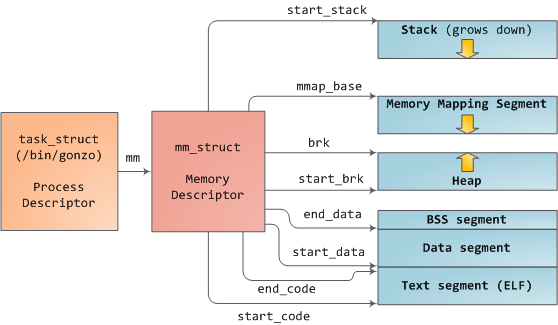
Linux processes are implemented in the kernel as instances of task_struct, the process descriptor. The mm field in task_struct points to the memory descriptor, mm_struct, which is an executive summary of a program’s memory. It stores the start and end of memory segments as shown above, the number of physical memory pages used by the process (rss stands for Resident Set Size), the amount of virtual address space used, and other tidbits. Within the memory descriptor we also find the two work horses for managing program memory: the set of virtual memory areas and the page tables. Gonzo’s memory areas are shown below:

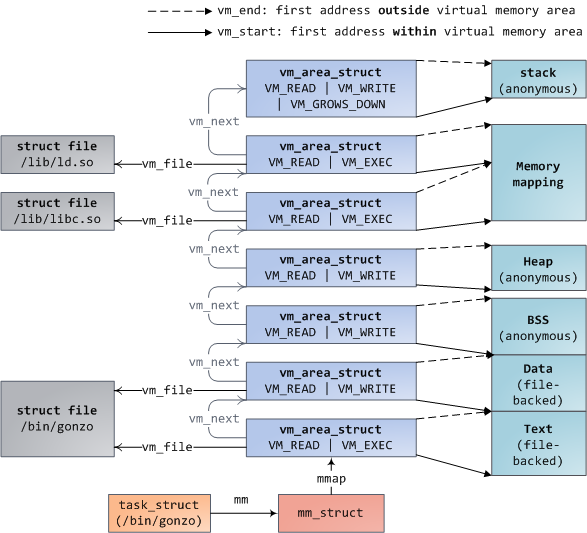
Each virtual memory area (VMA) is a contiguous range of virtual addresses; these areas never overlap. An instance of vm_area_struct fully describes a memory area, including its start and end addresses, flags to determine access rights and behaviors, and the vm_file field to specify which file is being mapped by the area, if any. A VMA that does not map a file is anonymous. Each memory segment above (e.g., heap, stack) corresponds to a single VMA, with the exception of the memory mapping segment. This is not a requirement, though it is usual in x86 machines. VMAs do not care which segment they are in.
A program’s VMAs are stored in its memory descriptor both as a linked list in the mmap field, ordered by starting virtual address, and as a red-black tree rooted at the mm_rb field. The red-black tree allows the kernel to search quickly for the memory area covering a given virtual address. When you read file /proc/pid_of_process/maps, the kernel is simply going through the linked list of VMAs for the process and printing each one.
In Windows, the EPROCESS block is roughly a mix of task_struct and mm_struct. The Windows analog to a VMA is the Virtual Address Descriptor, or VAD; they are stored in an AVL tree. You know what the funniest thing about Windows and Linux is? It’s the little differences.
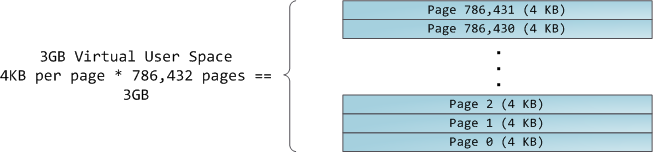
The 4GB virtual address space is divided into pages. x86 processors in 32-bit mode support page sizes of 4KB, 2MB, and 4MB. Both Linux and Windows map the user portion of the virtual address space using 4KB pages. Bytes 0-4095 fall in page 0, bytes 4096-8191 fall in page 1, and so on. The size of a VMA must be a multiple of page size. Here’s 3GB of user space in 4KB pages:

The processor consults page tables to translate a virtual address into a physical memory address. Each process has its own set of page tables; whenever a process switch occurs, page tables for user space are switched as well. Linux stores a pointer to a process’ page tables in the pgd field of the memory descriptor. To each virtual page there corresponds one page table entry (PTE) in the page tables, which in regular x86 paging is a simple 4-byte record shown below:

Linux has functions to read and set each flag in a PTE. Bit P tells the processor whether the virtual page is present in physical memory. If clear (equal to 0), accessing the page triggers a page fault. Keep in mind that when this bit is zero, the kernel can do whatever it pleases with the remaining fields. The R/W flag stands for read/write; if clear, the page is read-only. Flag U/S stands for user/supervisor; if clear, then the page can only be accessed by the kernel. These flags are used to implement the read-only memory and protected kernel space we saw before.
Bits D and A are for dirty and accessed. A dirty page has had a write, while an accessed page has had a write or read. Both flags are sticky: the processor only sets them, they must be cleared by the kernel. Finally, the PTE stores the starting physical address that corresponds to this page, aligned to 4KB. This naive-looking field is the source of some pain, for it limits addressable physical memory to 4 GB. The other PTE fields are for another day, as is Physical Address Extension.
A virtual page is the unit of memory protection because all of its bytes share the U/S and R/W flags. However, the same physical memory could be mapped by different pages, possibly with different protection flags. Notice that execute permissions are nowhere to be seen in the PTE. This is why classic x86 paging allows code on the stack to be executed, making it easier to exploit stack buffer overflows (it’s still possible to exploit non-executable stacks using return-to-libc and other techniques). This lack of a PTE no-execute flag illustrates a broader fact: permission flags in a VMA may or may not translate cleanly into hardware protection. The kernel does what it can, but ultimately the architecture limits what is possible.
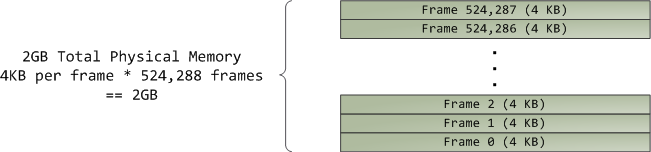
Virtual memory doesn’t store anything, it simply maps a program’s address space onto the underlying physical memory, which is accessed by the processor as a large block called the physical address space. While memory operations on the bus are somewhat involved, we can ignore that here and assume that physical addresses range from zero to the top of available memory in one-byte increments. This physical address space is broken down by the kernel into page frames. The processor doesn’t know or care about frames, yet they are crucial to the kernel because the page frame is the unit of physical memory management. Both Linux and Windows use 4KB page frames in 32-bit mode; here is an example of a machine with 2GB of RAM:
In Linux each page frame is tracked by a descriptor and several flags. Together these descriptors track the entire physical memory in the computer; the precise state of each page frame is always known. Physical memory is managed with the buddy memory allocation technique, hence a page frame is free if it’s available for allocation via the buddy system. An allocated page frame might be anonymous, holding program data, or it might be in the page cache, holding data stored in a file or block device. There are other exotic page frame uses, but leave them alone for now. Windows has an analogous Page Frame Number (PFN) database to track physical memory.
Let’s put together virtual memory areas, page table entries and page frames to understand how this all works. Below is an example of a user heap:
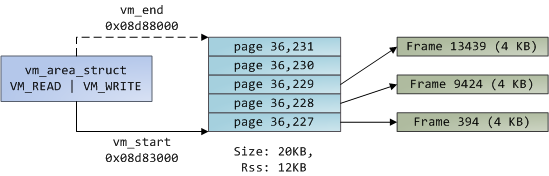
Blue rectangles represent pages in the VMA range, while arrows represent page table entries mapping pages onto page frames. Some virtual pages lack arrows; this means their corresponding PTEs have the Present flag clear. This could be because the pages have never been touched or because their contents have been swapped out. In either case access to these pages will lead to page faults, even though they are within the VMA. It may seem strange for the VMA and the page tables to disagree, yet this often happens.
A VMA is like a contract between your program and the kernel. You ask for something to be done (memory allocated, a file mapped, etc.), the kernel says “sure”, and it creates or updates the appropriate VMA. But it does not actually honor the request right away, it waits until a page fault happens to do real work. The kernel is a lazy, deceitful sack of scum; this is the fundamental principle of virtual memory. It applies in most situations, some familiar and some surprising, but the rule is that VMAs record what has been agreed upon, while PTEs reflect what has actually been done by the lazy kernel. These two data structures together manage a program’s memory; both play a role in resolving page faults, freeing memory, swapping memory out, and so on. Let’s take the simple case of memory allocation:
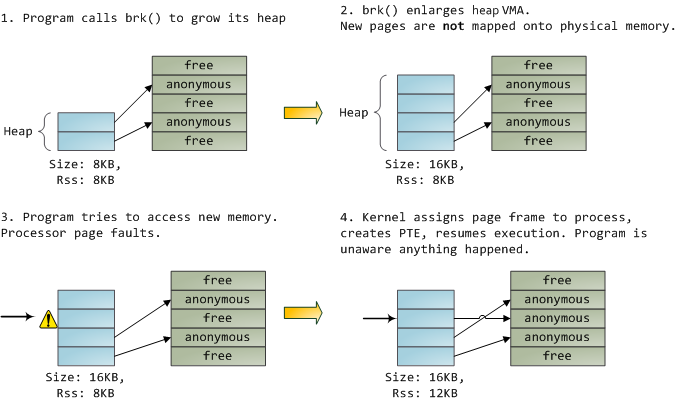
When the program asks for more memory via the brk() system call, the kernel simply updates the heap VMA and calls it good. No page frames are actually allocated at this point and the new pages are not present in physical memory. Once the program tries to access the pages, the processor page faults and do_page_fault() is called. It searches for the VMA covering the faulted virtual address using find_vma(). If found, the permissions on the VMA are also checked against the attempted access (read or write). If there’s no suitable VMA, no contract covers the attempted memory access and the process is punished by Segmentation Fault.
When a VMA is found the kernel must handle the fault by looking at the PTE contents and the type of VMA. In our case, the PTE shows the page is not present. In fact, our PTE is completely blank (all zeros), which in Linux means the virtual page has never been mapped. Since this is an anonymous VMA, we have a purely RAM affair that must be handled by do_anonymous_page(), which allocates a page frame and makes a PTE to map the faulted virtual page onto the freshly allocated frame.
Things could have been different. The PTE for a swapped out page, for example, has 0 in the Present flag but is not blank. Instead, it stores the swap location holding the page contents, which must be read from disk and loaded into a page frame by do_swap_page() in what is called a major fault.
This concludes the first half of our tour through the kernel’s user memory management. In the next post, we’ll throw files into the mix to build a complete picture of memory fundamentals, including consequences for performance.
Comments
66 Responses to “How The Kernel Manages Your Memory”
Leave a Reply
Another awesome post!
Hi
Wonderful post!
Got a question regarding memory in Windows though. Though not stated in your post, I was wondering if you could help.
In Windows, every process has its page directory located at virtual addr 0xC0300000 (or page table at 0xC0000000). However, the top 2GB (or 1GB) of virtual address space (0×80000000 or 0xC0000000 and above onwards) for each process actually maps to the same physical space because that is the kernel mem space (which is shared and identical amongst all process). So how can each individual process actually have different page directory/tables?
I’m sure i have an invalid logic somewhere, so kindly explain to me in details, if possible. Thanks
Sorry if that question was out of topic….
@jpm: thanks!
@Robert: definitely on topic.
The trick here is that the CPU actually wants a _physical_ address for the page directory, and _that_ address does change for each process.
Specifically, the _physical_ address of the page directory must be loaded into a register called CR3. When the kernel is about to switch to a process, say notepad.exe, it will load the _physical_ address of notepad’s page directory into CR3. When it switches to FireFox, a different physical address will go into CR3.
If you run the Windows kernel debugger (kd.exe) and type !process, it’ll print the ‘DirBase’ for the currently running process, which is the physical address of the page directory. It’ll be different for every process.
The Windows kernel must then update the system page tables to make 0xC0300000 point to the physical address of the new page directory as well. The PTE for that address (0xC0300000) is not marked global, so that when CR3 is refreshed, its contents are purged from the TLB in case the processor had cached the old physical address for it.
Hope this helps. Feel free to ask follow up questions, though the next answer might take a while because I’m UTC-7 and it’s 1am
Great thanks for yet another good article. Nice work.
Great post. Thank you for the detail and the time you spent on the diagrams.
Nice article, nice diagrams! it’s so clear! tks!
Gustavo, I’ve been reading your posts for several weeks now. As a rising open-source operating system developer, I’ve found you to be very enlightening on topics that others are cryptic on.
Keep up the great work!
[...] hope the previous post explained virtual memory adequately, but I must admit I held back a much better explanation, which [...]
[...] https://secure.delicious.com/login?noui=yes&v=5&src=ffbmext2.1.018&partner=ffbmext http://duartes.org/gustavo/blog/post/how-the-kernel-manages-your-memory page tags: todo-linux page_revision: 5, last_edited: 1233762364|%e %b %Y, %H:%M %Z (%O ago) [...]
[...] How The Kernel Manages Your Memory – Also by Gustavo with a follow-up about the related memory management by the kernel [...]
Hi Gustavo, I have been reading your internals blogs. The diagrams included in these blogs look really nice and clear. What tool did you use to generate these diagrams (.png image files)?
Hi Gustavo,
Thanks for the prompt reply (for post no.2). That is indeed clear and concise. I’ve got afew follow up questions, hope you dont mind!
For Windows, since 0xC0300000 / 0xC0000000 differs for each process, so am i right to say that the kernel mem space (upper 2GB) for all processes are actually not identical? My impression was that the kernel mem space for all processes are mapped to the same physical addr… perhaps not for Windows but for Linux only (as quoted from “Anatomy of a Program in Memory” -> In Linux, kernel space is constantly present and mapped to the same physical memory in all processes.)
Another question for Windows: should say, for example, during runtime process A loads a kernel driver (eg SysInternals tools), will this driver code actually be in the kernel address space of other processes as well? Will the stack data of the kernel also be the same across all processes?
Thanks for the help~!
wonderful!!
[...] How The Kernel Manages Your Memory : Gustavo Duarte (tags: linux architecture cs) [...]
Great article. I’m a little bit curious about the page size. You mention that “Both Linux and Windows map the user portion of the virtual address space using 4KB pages.” — what are some situations where bigger page sizes (2MB, 4MB) are used (if any)?
Thank you all for the feedback.
@John: It’s MS Visio 2007, here’s more info:
http://duartes.org/gustavo/blog/post/quick-note-on-diagrams-and-the-blog
@Robert: you’re welcome. Here are the answers on the other questions. Windows internals is a bit tougher due to the lack of source code, but I think this is pretty accurate.
1. You’re 100% right - kernel space in Windows is not identical for every process. Not only there’s this page directory issue, but also in Windows ’session space’ is mapped in kernel space. So processes in different sessions (ie, processes on different Remote Desktop connections) will have difference session space, hence differences in their kernel space mappings. Two processes in the same session though would have the same session space.
In x86 Linux the mappings for kernel space _are_ identical in all the processes. They are built during boot (see here) and stored in swapper_pg_dir (that’s an extern, not the actual declaration). Since it’s Linux, processes are forked (copied) when they’re being started, so the copy_process() function is called, which copies the memory descriptor, which eventually clones physical addresses of page tables in swapper_pg_dir into the new process’ page tables. Wheew! The result is simple though: shared kernel space for everyone.
Regarding the driver, yes, visible to everybody.
Regarding stack, no. Each thread has its own kernel-mode stack. But this can be arranged by manipulating the stack pointer to different virtual addresses, so no page table hacking needed. Having per-thread kernel stacks is important, because when a thread goes to sleep in the middle of a system call (say, waiting on disk) its state must be preserved, and that’s basically the stack (and registers, which get pushed onto the stack).
@Arthur: good catch
It turns out that Linux maps kernel space using 4MB pages. Windows also does it, depending on the amount of memory in the box. This is mainly for performance, to save entries in the TLB cache, which caches the physical address associated with a page. By using 4MB pages, the kernel uses up less TLB entries, and dirties less of them when handling syscalls and interrupts.
Nice article, and I really want to know what program do you use to draw these amazing diagrams?
sesedi: this comes up in almost every post, I guess people like the diagrams
it’s Visio.
(You might want to try Inkscape at some point. It’s far nicer to use than the dire dia.)
@Nix: thanks for the suggestion. I’ll give it a shot.
Nice article and excellent writing style.
[...] How The Kernel Manages Your Memory VN:F [1.0.9_379]please wait…Rating: 0.0/10 (0 votes cast) [...]
Excellent article. I really enjoy reading them. Thanks!
Can’t wait for Part 2.
thank you guys for the feedback.
@triton: I’m getting pretty fast at cranking these out, I should have some time over the weekend
[...] Много букв, цифр и красивых картинок o Linux internals, How The Kernel Manages Your Memory : Gustavo Duarte [...]
做的不错。我在这里学到了很多知识。加油!
Great jobs. I have learn more knowledge from here.Come on!
Hi Gustavo,
Man ,you are just too good.Your diagrams and explanation have cleared many of my doubts regarding virtual memory,memory mapping.
Looking forward to reading many more articles in the future.
Thanks
Siddharth
[...] we looked at how the kernel manages virtual memory for a user process, but files and I/O were left out. This post covers the important and often [...]
@siddharth: cool, I’m glad it helped!
Hi Gustavo,
your articles are interesting indeed.
I have a problem, when a kernel is loaded and enabled paging, all memory addressing is per virtual memory addressing among kernel itself. So when the kernel calls it’s functions or uses it’s memory area (variables and etc) it must follow new addressing model (virtual), so some things must do in boot loader like load kernel on, say, 0×100000 physical memory address but, say, at 0xC0000000 as virtual address, now if kernel switch to paging, it must map 0×100000 to 0xC0000000 to keep on it’s running. How can I doing it? and how manage kernel’s memory? and when paging is enabled we must yet use CS, DS and SS for code, data and stack positions respectively?
Can you explain it in detail, please?
Thanks a lot for your attention.
Majid,
That’s a great question. I’ll give you some pointers, but I’m short on time.
During the boot process, the kernel builds page tables before enabling virtual memory in the CPU. The initial paging tables map two virtual ranges onto the first 8 megabytes of physical memory. The code is here. The first range is called the identity mapping and it maps virtual addresses 0-8MB (not sure on the 8MB, but something like that) onto physical addresses 0-8MB. The second virtual range maps another ~8MB starting at virtual address 0xc0000000 onto the 0-8MB of physical memory.
That way, immediately after the paging is enabled, things are still working OK thanks to the identity mapping. The kernel can then jump to the 0xc0000000 addresses and it will also work thanks to the second range. It then calls a function called ‘zap_low_mappings’ or something like that to blow away the identity mapping. Everything is up and running as far as paging goes by then.
Regarding cs, ds, and ss, they are already active even before paging is turned on. But they use ‘flat model’ so they are basically transparent. They all start at 0 and span 4GB, so all logical addresses are the same as linear addresses, it’s as if segmentation does not exist. These are set up BEFORE paging is enabled though, they are independent of paging.
Hope this helps. I’m going to be away for a few days, but feel free to post more questions and I’ll eventually get to them.
Thanks a lot Gustavo, your explain is really clear and fluent whereas it is concise.
That is very useful for me.
Thanks again for your attention and helps.
Hi Gustavo,
Excuse me for my (probably) bad english.
When we want to allocate new page frame, we must fill related page table’s entry, so we must access to page table memory address with it’s virtual address. What is your idea to do that? create an entry to link itself, so we can access it as if normal page, or another idea?
Thanks
Hi Majid,
When the kernel allocates memory to store a page table, it asks the allocator for memory that is always mapped by the kernel space (in x86 Linux’s case, this means physical memory between 0 and 896MB, which is mapped starting at 0xc0000000). Hence page tables for processes can always be reached with kernel-space virtual addresses.
The pgd pointer in the mm_struct points to the first level of page tables (the page directory), so the kernel can just use the pointer to access it. To reach other levels of the page table, the kernel may have to calculate which linear address corresponds to the physical address of the page table, but this is easy to do because the first 896MB are mapped continuously in kernel space, so it’s a simple operation to go from physical address to virtual address.
[...] we looked at how the kernel manages virtual memory for a user process, but files and I/O were left out. This post covers the important and often [...]
Hi, I like your blog! you reply to Majid in #34:
“(in x86 Linux’s case, this means physical memory between 0 and 896MB,
which is mapped starting at 0xc0000000).”
I have a question: In order to save physical memory, kernel and process
may map same virtual address to one physical address. For example:
0xc500 0000 -> 0×0500 0000
0×4567 0000 -> 0×0500 0000
Assume that kernel modifies the contents at virtual address 0×4567 0000,
that is, the position at physical address 0×0500 0000, then the user
process will see this change!
Now that kernel maps the physical memory between 0 and 896MB to 3G+
virtual address space , where the user process will map its virtual
address? I mean, the position of its corresponding physical address.
the first 896MB physical memory belongs to kernel, right?
then where a user process map its virtual address?
If the process and the kernel share the first 896MB physical memory,
How they avoid colliding?
this question haunting me for a long time, thank you for your help!
sorry ,
Assume that kernel modifies the contents at virtual address 0×4567 0000,
should be
Assume that kernel modifies the contents at virtual address 0×c500 0000,
Hi Gustavo Duarte,
Nice post, very much informative! For the first time in my life, I understand the internals of the memory management, thank you! And I got a question here: where and how does the linux kernel maintains the physical page frames? Can you give some information about physical page frames’ initialization and maintenance in the kernel?
@littlekernel,
Sorry about the delay.
So, the kernel does _not_ take the first 896MB of physical memory. It only takes the last 1GB of _virtual space_ to use it to map whatever physical memory it wants. In Linux’s case, the kernel uses this last gigabyte to map the first 896MB of _physical_ memory and then uses the remaining 128MB of virtual address space to map things dynamically and for other special-purpose mappings.
@sxg: you’re welcome.
Regarding the page frame stuff, they’re kept in an array of structs of type page_structs. The array itself is called mem_map. In computers where RAM access is uniform to all processors (uniform memory access) we usually have a single huge mem_map array with all the page structs in it. This is the case for most Intel processors prior to the Core 2 Duo. AMD processors, and Intel now with the Core 2 duo, are NUMA - non uniform memory access, where processors are attached directly to memory. In this situation you have multiple mem_map arrays to describe the physical memory attached to each processor.
I’ll write more about this topic, but I’m in a bit of a hiatus right now, I’ll post shortly on what’s going on.
great set of posts!
i want to write a kernel module to print the page table of a particular process and access physical memory address to read the value of a variable of another process. i have played a little with kernel modules (like changing value of runnable to 0 for init_task, changing pid of all processes…resulting in flooding of kernel error messages ), but i am unable to proceed with this program. could you help me?
@Rohit: I can help some. However, it’s a bad time for me right now, because I started writing a blog / publishing engine to run the blog on, so that’s taking all my free time. Feel free to contact me directly via email or here via the comments.
Great post!
I’m working on something protection-related and have a question: how to set one area (say, 4kB in size, or 4MB, or 8MB, etc. in kernel space) to be read-only or non-executable or non-writable for kernel itself? Thanks.
iceui: Are you thinking of it in terms of the Linux kernel API for these things, or in terms of what such a page table entry would look like in x86 processors?
I’m thinking of using my driver in kernel space to do this…similar to kernel API…to protect other driver/API to read/write/exec some kernel area.
As you point out, Linux maps kernel space using 4MB pages. Does it mean Kernel virtual space has, say, 1GB/4MB==250 pages? Where are they? Can we manipulate those kernel page table entries in terms of R/W, D, A, P, etc? http://static.duartes.org/img/blogPosts/x86PageTableEntry4KB.png
We also know Linux maps kernel virtual address 0xC0000000 to physical address 0×00000000…seems only one kernel page mapping available and we cannot modify any R/W, D, A, etc.?
I do appreciate if you have time to clarify my doubts. Thanks!
Gustavo Duarte, we are eager to read your posts about the dll.
I’m thinking of using my driver in kernel space to do this…similar to kernel API…to protect other driver/API to read/write/exec some kernel area.
As you point out, Linux maps kernel space using 4MB pages. Does it mean Kernel virtual space has, say, 1GB/4MB==250 pages? Where are they? Can we manipulate those kernel page table entries in terms of R/W, D, A, P, etc?
We also know Linux maps kernel virtual address 0xC0000000 to physical address 0×00000000…seems only one kernel page mapping available and we cannot modify any R/W, D, A, etc.?
I do appreciate if you have time to clarify my doubts. Thanks!
sir i want source code for static,stack and heap memory allocation done in graphics (whole source code) please send it to my mail .
i requeat you please to send me the same. ok thanking you
I really like your graphical representations, your pictures are even better than some books, Great!
hi Gustavo,
Nice work. please continue your posting.
I need clarification on swappable and now swappable pages in the memory, I ve heard that certain pages are not swappable. can you please explain on that..? .
Are you going to post on Linux Block I/O .? I m very interested on it.
@Narayanan: thanks for the feeback. I’ll definitely continue posting. To be honest, I took a little detour writing software to post _with_. That’s why the blog has been quiet. I’ll give an update on this stuff soon, but in short, there will definitely be more content.
Hi Duarte,
I have read and re-read your articles several times, they’re just like story-telling, Thank you.
I have a burning question: The kernel has a page structure that describes a physical page in memory. But this description does not including the physical address of the page. How is this retrieved? (I understand pte structures have the physical address data but how we reference a pte structure from a page structure?)
Also I understand that mem_map is a global variable that is a list of all pages in physical memory (correct me if I’m wrong). But, what use this array if we can’t figure out the physical address of a page?
Thanks!
Joel
I have read your post. Its excellent.
I am trying to understand the concept of virtual memory. But however hard I try.. I still dont get it. My bsaic question is as follows:
Virtual address from 0×00000000 to 0×00300000 are mapped to physical addresses 0×00000000 to 0×00300000. ie we have an identity mapping, by means of page tables some where in physical memory whose virtual addresses are not known.
Now my physical frame allocator says that a page in physical memory starting at addresses 0×00400000 is free ie page frame 1024 is free.
How can I now access this page
Great thanks Gustavo Duarte…this article is excellent..
Can you please give us some reference to good websites or blogs that deals with in depth about Kernel core.
HI Gustavo Duarte,
I do not why you are taking so much effort to explain such excellent articles. I really appreciate your efforts.
Thank you very much …….
Hello
Gustavo, you done with with your blog engine. doing it alone!
it seems you are writing well engineered code. that is why it is taking so much of time.
Hi Gustavo,
I must appreciate ur great work..Actually,putting the things with examples and with source code is really expected while studing linux kernel internals.
Being a linux freak,I started to read ur article on memory mgmt amd couldnt stop myself from further reading..Great work indeed.
Hi Gustavo,
I agree with Joel.
The high memory stuff in which page discrptrs are allocated instead of pages since those pages dont have corresponding logical kernel address,is somewhere missing in your article.
I hope u will come up with it..
Anyways Kudos for your great work.
hi sir………..
nice work,really fantastic and awesome work, please continue your posting…..
Hello Gustavo,
I recently found these blog. It is very helpful for me to understand some basic things. I really appreciate your time for this.
I have some basic doubts, which i think you can easily answer.
1) If we have same shared libraries(eg: libc.so) loaded for more than 2 process. The shared library VM address in the two process will be identical or different ?, as far as i know, in physical memory they will be loaded only once.
2) The entire VM address of a process is created during process creation, or the VM address is also created dynamically ?. eg: if i am creating a process p1(which uses lots of shared libraries), the whole VM address (if it uses a VM address space of 2GB) is allocated dynamically or statically during process creation.
Can you please address my queries ?.
Regards,
Shammi
Hi Shammi,
There are different sections that are required for every section, different VM area structs are created for these. VM addresses are allocated for these sections by default. Access to any other virtual address results in a fault. The process ofcourse has all the memory for itself (no one else can take it) but to make this memory accessible dynamically, you would do it in many ways: malloc to allocate memory on the heap, grow the heap with brk system call or memory map a file.
Hope this answers your question.
Hi Shammi,
Answering your first question, the shared library virtual addresses could be different (shared libraries are compiled with position independent code so they can be relocated any where in virtual memory) - the dynamic loader takes care of resolving symbols at runtime. The shared library’s physical memory is allocated only once and shared by all other processes (think about how many different copies of the c standard library would be there otherwise :)).
Wonderful!
I have a question, there is only 20 bit for physical address. How could it represents the memory physical address?
Thank you!
Hi Lin,
kernel manages physical memory with unit of 4KB, which is 2^12, so 20bit is left enough to address these 4KB unit on 32-bit platform.
[...] How The Kernel Manages Your Memory – “After examining the virtual address layout of a process, we turn to the kernel and its mechanisms for managing user memory…” [...]
i need to know the exact procedure what happens wen page is selected to swap out..where in pte entry is made?? low level details wat struct is used??
plz help me out