CPU Rings, Privilege, and Protection
You probably know intuitively that applications have limited powers in Intel x86 computers and that only operating system code can perform certain tasks, but do you know how this really works? This post takes a look at x86 privilege levels, the mechanism whereby the OS and CPU conspire to restrict what user-mode programs can do. There are four privilege levels, numbered 0 (most privileged) to 3 (least privileged), and three main resources being protected: memory, I/O ports, and the ability to execute certain machine instructions. At any given time, an x86 CPU is running in a specific privilege level, which determines what code can and cannot do. These privilege levels are often described as protection rings, with the innermost ring corresponding to highest privilege. Most modern x86 kernels use only two privilege levels, 0 and 3:
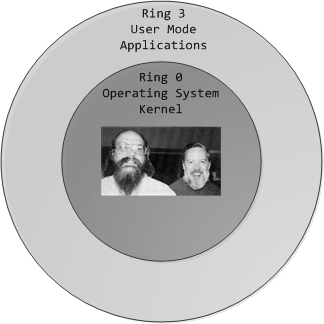
x86 Protection Rings
About 15 machine instructions, out of dozens, are restricted by the CPU to ring zero. Many others have limitations on their operands. These instructions can subvert the protection mechanism or otherwise foment chaos if allowed in user mode, so they are reserved to the kernel. An attempt to run them outside of ring zero causes a general-protection exception, like when a program uses invalid memory addresses. Likewise, access to memory and I/O ports is restricted based on privilege level. But before we look at protection mechanisms, let’s see exactly how the CPU keeps track of the current privilege level, which involves the segment selectors from the previous post. Here they are:
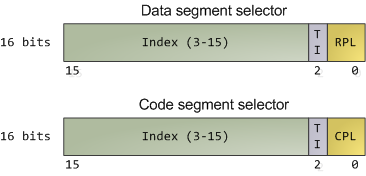
Segment Selectors - Data and Code
The full contents of data segment selectors are loaded directly by code into various segment registers such as ss (stack segment register) and ds (data segment register). This includes the contents of the Requested Privilege Level (RPL) field, whose meaning we tackle in a bit. The code segment register (cs) is, however, magical. First, its contents cannot be set directly by load instructions such as mov, but rather only by instructions that alter the flow of program execution, like call. Second, and importantly for us, instead of an RPL field that can be set by code, cs has a Current Privilege Level (CPL) field maintained by the CPU itself. This 2-bit CPL field in the code segment register is always equal to the CPU’s current privilege level. The Intel docs wobble a little on this fact, and sometimes online documents confuse the issue, but that’s the hard and fast rule. At any time, no matter what’s going on in the CPU, a look at the CPL in cs will tell you the privilege level code is running with.
Keep in mind that the CPU privilege level has nothing to do with operating system users. Whether you’re root, Administrator, guest, or a regular user, it does not matter. All user code runs in ring 3 and all kernel code runs in ring 0, regardless of the OS user on whose behalf the code operates. Sometimes certain kernel tasks can be pushed to user mode, for example user-mode device drivers in Windows Vista, but these are just special processes doing a job for the kernel and can usually be killed without major consequences.
Due to restricted access to memory and I/O ports, user mode can do almost nothing to the outside world without calling on the kernel. It can’t open files, send network packets, print to the screen, or allocate memory. User processes run in a severely limited sandbox set up by the gods of ring zero. That’s why it’s impossible, by design, for a process to leak memory beyond its existence or leave open files after it exits. All of the data structures that control such things - memory, open files, etc - cannot be touched directly by user code; once a process finishes, the sandbox is torn down by the kernel. That’s why our servers can have 600 days of uptime - as long as the hardware and the kernel don’t crap out, stuff can run for ever. This is also why Windows 95 / 98 crashed so much: it’s not because “M$ sucks” but because important data structures were left accessible to user mode for compatibility reasons. It was probably a good trade-off at the time, albeit at high cost.
The CPU protects memory at two crucial points: when a segment selector is loaded and when a page of memory is accessed with a linear address. Protection thus mirrors memory address translation where both segmentation and paging are involved. When a data segment selector is being loaded, the check below takes place:
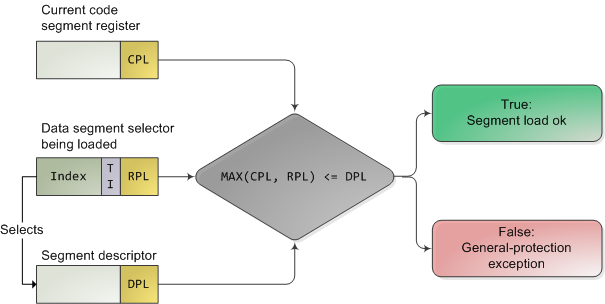
x86 Segment Protection
Since a higher number means less privilege, MAX() above picks the least privileged of CPL and RPL, and compares it to the descriptor privilege level (DPL). If the DPL is higher or equal, then access is allowed. The idea behind RPL is to allow kernel code to load a segment using lowered privilege. For example, you could use an RPL of 3 to ensure that a given operation uses segments accessible to user-mode. The exception is for the stack segment register ss, for which the three of CPL, RPL, and DPL must match exactly.
In truth, segment protection scarcely matters because modern kernels use a flat address space where the user-mode segments can reach the entire linear address space. Useful memory protection is done in the paging unit when a linear address is converted into a physical address. Each memory page is a block of bytes described by a page table entry containing two fields related to protection: a supervisor flag and a read/write flag. The supervisor flag is the primary x86 memory protection mechanism used by kernels. When it is on, the page cannot be accessed from ring 3. While the read/write flag isn’t as important for enforcing privilege, it’s still useful. When a process is loaded, pages storing binary images (code) are marked as read only, thereby catching some pointer errors if a program attempts to write to these pages. This flag is also used to implement copy on write when a process is forked in Unix. Upon forking, the parent’s pages are marked read only and shared with the forked child. If either process attempts to write to the page, the processor triggers a fault and the kernel knows to duplicate the page and mark it read/write for the writing process.
Finally, we need a way for the CPU to switch between privilege levels. If ring 3 code could transfer control to arbitrary spots in the kernel, it would be easy to subvert the operating system by jumping into the wrong (right?) places. A controlled transfer is necessary. This is accomplished via gate descriptors and via the sysenter instruction. A gate descriptor is a segment descriptor of type system, and comes in four sub-types: call-gate descriptor, interrupt-gate descriptor, trap-gate descriptor, and task-gate descriptor. Call gates provide a kernel entry point that can be used with ordinary call and jmp instructions, but they aren’t used much so I’ll ignore them. Task gates aren’t so hot either (in Linux, they are only used in double faults, which are caused by either kernel or hardware problems).
That leaves two juicier ones: interrupt and trap gates, which are used to handle hardware interrupts (e.g., keyboard, timer, disks) and exceptions (e.g., page faults, divide by zero). I’ll refer to both as an “interrupt”. These gate descriptors are stored in the Interrupt Descriptor Table (IDT). Each interrupt is assigned a number between 0 and 255 called a vector, which the processor uses as an index into the IDT when figuring out which gate descriptor to use when handling the interrupt. Interrupt and trap gates are nearly identical. Their format is shown below along with the privilege checks enforced when an interrupt happens. I filled in some values for the Linux kernel to make things concrete.
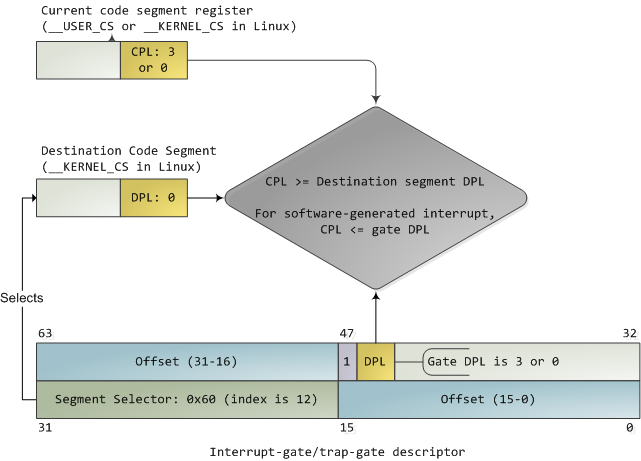
Interrupt Descriptor with Privilege Check
Both the DPL and the segment selector in the gate regulate access, while segment selector plus offset together nail down an entry point for the interrupt handler code. Kernels normally use the segment selector for the kernel code segment in these gate descriptors. An interrupt can never transfer control from a more-privileged to a less-privileged ring. Privilege must either stay the same (when the kernel itself is interrupted) or be elevated (when user-mode code is interrupted). In either case, the resulting CPL will be equal to to the DPL of the destination code segment; if the CPL changes, a stack switch also occurs. If an interrupt is triggered by code via an instruction like int n, one more check takes place: the gate DPL must be at the same or lower privilege as the CPL. This prevents user code from triggering random interrupts. If these checks fail - you guessed it - a general-protection exception happens. All Linux interrupt handlers end up running in ring zero.
During initialization, the Linux kernel first sets up an IDT in setup_idt() that ignores all interrupts. It then uses functions in include/asm-x86/desc.h to flesh out common IDT entries in arch/x86/kernel/traps_32.c. In Linux, a gate descriptor with “system” in its name is accessible from user mode and its set function uses a DPL of 3. A “system gate” is an Intel trap gate accessible to user mode. Otherwise, the terminology matches up. Hardware interrupt gates are not set here however, but instead in the appropriate drivers.
Three gates are accessible to user mode: vectors 3 and 4 are used for debugging and checking for numeric overflows, respectively. Then a system gate is set up for the SYSCALL_VECTOR, which is 0×80 for the x86 architecture. This was the mechanism for a process to transfer control to the kernel, to make a system call, and back in the day I applied for an “int 0×80″ vanity license plate :). Starting with the Pentium Pro, the sysenter instruction was introduced as a faster way to make system calls. It relies on special-purpose CPU registers that store the code segment, entry point, and other tidbits for the kernel system call handler. When sysenter is executed the CPU does no privilege checking, going immediately into CPL 0 and loading new values into the registers for code and stack (cs, eip, ss, and esp). Only ring zero can load the sysenter setup registers, which is done in enable_sep_cpu().
Finally, when it’s time to return to ring 3, the kernel issues an iret or sysexit instruction to return from interrupts and system calls, respectively, thus leaving ring 0 and resuming execution of user code with a CPL of 3. Vim tells me I’m approaching 1,900 words, so I/O port protection is for another day. This concludes our tour of x86 rings and protection. Thanks for reading!
Comments
32 Responses to “CPU Rings, Privilege, and Protection”
Leave a Reply
Wow! Amazing articles Gustavo. I have a question regarding the Memory Translation article. You had mentioned that modern x86 kernels use the “flat model” without any segmentation. But won’t that restrict the size of the addressable memory to ~4GB? But I’ve seen computers with more than 4GB installed, how does that work? Or is it a restriction per program rather than the total memory?
Thanks!
The segments only affect the translation of “logical” addresses into “linear” addresses. Flat model means that these addresses coincide, so we can basically ignore segmentation. But all of the linear addresses are still fed to the paging unit (assuming paging is turned on), so there’s more magic that happens there to transform a linear address into a physical address.
Check the first diagram of the previous post, it should make it more clear. Flat model eliminates the first step (logical to linear), but the last step remains and enables addressing of more than 4GB.
Now, regarding maximum memory, there are three issues: the size of the linear address space, the conversion of a linear address into a physical address, and the physical address pins in the processor so it can talk to the bus.
When the CPU is in 32-bit mode, the linear address space is _always_ 32-bits and is therefore limited to 4 GB. However, the physical pins coming out of CPU can address up to 64GB of RAM on the bus since the Pentium Pro.
So the trouble is all in the translation of linear addresses into physical addresses. When the CPU is running in “traditional” mode, the page tables that transform a linear address into a physical one only work with 32-bit physical addresses, so the computer is confined to 4 GB total RAM.
But then Intel introduced the Physical Address Extension (PAE) to enable servers to use more physical memory. This changes the MECHANISM of translation of a linear address into a physical address. It works by changing the format of the page tables, allowing more bits for the physical address. So at that point, more than 4 GB of physical memory CAN be used.
The problem is that processes are still confined to a 32-bit linear address space. So if you have a database server that wants to address 12 gigs, say, it will have to map different regions of physical memory at a time. It only has a 4 gig linear window into the 12 gigs of physical ram.
Did that make sense?
Hi, this is a nice article, thank you. I also read the other stuff I found on this site and I really like your writing style (very user friendly, you could be a teacher) and the topics you cover. I’ve subscribed to the RSS feed and am looking forward to your new articles.
I’m really impressed.
I have a question - which tool do you use to draw those awesome diagrams? (I hope not Visio)
@Alex: thanks!
Unfortunately, it is Visio 2007. I haven’t tried the open office counterpart. If anyone knows of a FOSS alternative that can produce good diagrams, I’d love to hear about it. I’d like to publish some of this stuff as diagrams for people to reuse (especially network packets), so it’d be cool to have an open platform.
I always thought each user process in Linux had its OWN segment and 4 gigs of virtual address space. I kind of see now that each process does not have its own segment, but if that is true how does the kernel let each process have its own 4 gigs worth of virtual space?
Having the same segment only affects the translation of logical addresses into linear addresses - and flat mode makes them the same. Most CPUs don’t even have a distinction between “logical” and “linear” - they only deal with linear and physical addresses. It’s an accident of history that x86 ended up with this logical/linear distinction, and x86-64 basically gets rid of it.
But each process still has a different set of _page tables_ mapping its 32-bit linear address space into physical addresses. So the way you thought is actually accurate, it’s just the terminology that was fuzzy. Processes have their own _page tables_, not segment.
Hey Gustavo, thanks for taking the time to clarify my question. Now that brings up another sub-question. If we want to use the PAE, we need changes in the kernel code, right? Is that why we have server versions of Windows? A little bit of googling provides insight into how Linux handles this. I believe they enable PAE by default these days, is my understanding correct?
@Amjith: that’s right, the kernel needs to do most of the work, since it’s the one responsible for building the page tables for the processes.
Also, if a single process wants to use more than 4GB, then the process _also_ must be aware of this stuff, because it needs to make system calls into the kernel saying “hey, I want to map physical range 5GB to 6GB in my 2GB-3GB linear range”, or “map 10GB-11GB now”, and so on. (Of course, there would be security checks. Also, these are some nice round numbers, usually it’d probably be done in chunks of X KB of memory, depends on the application).
Regarding Windows, that’s an interesting point. It’s too strong to say that PAE _is_ why we have server versions of Windows, but it’s definitely something Microsoft has used extensively for price discrimination. Not only on the Windows kernel, but also apps like SQL Server have pricier editions that support PAE. The kernel for the server editions of Windows has other tweaks as well though, in the algorithms for process scheduling and also memory allocation. But PAE has definitely been one carrot (or stick?) to get some more money.
Linux has had PAE support since the start of 2.6. To use it one must enable it at kernel compile time. I’m not sure if it’s enabled in the kernels that ship with the various distros. I’ve never looked much into the kernel PAE code to be honest, so I’m ignorant here. My understanding though is that if it’s enabled, it’s once and for all in the machine, for all CPUs and processes.
[...] being protected: memory, I/O ports, and the ability to execute certain machine instructions. At any given time, an x86 CPU is running in a specific privilege level, which determines what code c…. Write a [...]
Nice article. Just wondering, which software do you use to create the images?
@Manav: thanks. I use MS Visio 2007.
I really like your articles.
Keep on writing 
Hey Gustavo,
Since you asked for an alternative for Visio you can give Dia a shot. “Dia is roughly inspired by the commercial Windows program ‘Visio’, though more geared towards informal diagrams for casual use.” That is a quote from their website.
Great article. Though I understood very little :), I can appreciate that the subject has been lucidly explained. Do keep on writing, I for one am going to be dropping by often.
Great series of articles.
I learned lots of intricate parts of the x86 arch that I did not learn at school.
Keep up the good work!
What happened to ring 1 and 2?
Thank you all for the feedback
@Aditya: is there a specific part where it “trails off” and stops making sense? Anything I can do, any definitions to introduce, that might clear it up? I’m really interested in learning how to improve my writing to make it more understandable, so I appreciate feedback on this.
@D’oh: I’ll quote from an excellent comment on osnews by siride:
Because other platforms only had two modes, so OSes intended to be used cross-platform preferred to use only two of the four rings. Also, some parts of the IA-32 architecture don’t distinguish 4 rings, but only two modes: system and user, where system means rings 0, 1 and 2, and user means ring 3. Page protection is like this, for example. And finally, adding extra rings just adds extra complexity that could probably be dealt with by using more comprehensive security methodologies, which is currently the case. In much the same way that it’s better to avoid using x86 segmentation or TSS’s for task switching in favor of a software solution that is portable and can be fine-tuned to the needs of the OS in general, or even at a particular point in time (such as under heavy load, etc.).
Great article as always Gustavo, keep up the good work. You’ve helped clear so many cobwebs in my head. Thanks!
[...] here Share this: These icons link to social bookmarking sites where readers can share and discover new [...]
Great article Gustavo! Like the others. Could you mention good resources and bibliography? Keep on writing:)
Thank you all for the feedback.
@Marcelo: Check out the suggestions at the end of my posts about motherboard chipsets and also the kernel boot process, they link to a few good resources. I really like the Intel documents and those kernel books.
Also, if you are particularly interested in low-level security, the book Subverting the Windows Kernel is a great read, focused on Windows.
Nice Article,
I found this researching the extensions Intel made to support virtualization. If you have any insight into that I think it would make a great article.
Hello Gustavo,
How can one transfer from Ring 0 to Ring 3 ? Or more generalized from a more privileged to a less privileged mode?
Thanks,
lallous
Hi Gustavo Duarte,
All your articles are extremely great:). I am enjoying your articles.
I am asking a question which is come from your a reply to a question with title “Amjith on August 22nd, 2008 8:59 am”. In that reply you mentioned, to use PAE we need some changes in the kernel code.
Please please correct me if I am wrong.
My thinking like below:
Whenever we want to use PAE, we need to write code,in kernel:
1. which will enable PAE bit in control register
2. Security check at kernel code level
And whenever any application want to map physical range, let say, 5GB to 6GB in 2GB-3GB linear range then this requirement will be handle by hardware itself(Note: This is contradiction with your reply). Kernel dont have to handle this.
To handle above requirement hardware will do like below:
1. First check for PAE is enable or not
2. if PAE is not enable then trap will happen
3. If PAE is enable then complete the reqirement.
All above info from me is my intuitive feeling.
I am requesting u please correct me if I am wrong.
Thanks
Hi Gustavo Duarte,
All your articles are extremely great:). I am enjoying your articles.
I am asking a question which is come from your a reply to a question with title “Amjith on August 22nd, 2008 8:59 am”. In that reply you mentioned, to use PAE we need some changes in the kernel code.
Please please correct me if I am wrong.
My thinking like below:
Whenever we want to use PAE, we need to write code,in kernel:
1. which will enable PAE bit in control register
2. Security check at kernel code level
And whenever any application want to map physical range, let say, 5GB to 6GB in 2GB-3GB linear range then this requirement will be handle by hardware itself(Note: This is contradiction with your reply). Kernel dont have to handle this.
To handle above requirement hardware will do like below:
1. First check for PAE is enable or not
2. if PAE is not enable then trap will happen
3. If PAE is enable then complete the reqirement.
All above info from me is my intuitive feeling.
I am requesting u please correct me if I am wrong.
Thanks
“First, its contents cannot be set directly by load instructions such as mov, “, probably it’s wrong.The following is excerpted from INTEL 80386 PROGRAMMER’S REFERENCE MANUAL ,1986.
3.10 Segment Register Instructions
This category actually includes several distinct types of instructions.
These various types are grouped together here because, if systems designers
choose an unsegmented model of memory organization, none of these
instructions is used by applications programmers. The instructions that deal
with segment registers are:
1. Segment-register transfer instructions.
MOV SegReg, …
MOV …, SegReg
PUSH SegReg
POP SegReg
2. Control transfers to another executable segment.
JMP far ; direct and indirect
CALL far
RET far
3. Data pointer instructions.
LDS
LES
LFS
LGS
LSS
sorry,you’re right. It’s my fault
Hi baozhao ,
Sorry, I did not get you.You r replying to my answer?
If yes, Please please write clear reply(because i dont know much about x86 assembly programming)…
Thanks for your reply…..Please reply to my answer asp.
Thank You
Anand
[...] CPU rings, privilege, and protection. © 1999-2008 Justin Blanton (email) e v e r y t h i n g i s r e l a t i v e In partnership with [...]
Hi Gustavo,
“When sysenter is executed the CPU does no privilege checking, going immediately into CPL 0″
I was wondering what exactly happens when SYSENTER is called. The code control will be transferred to SegSelector:Offset pointed by vector 0×80 in the IDT is it? Usually what does that code do….?
How will the usermode application then differentiate the various calls made to the kernel mode, eg: a call to get a file; to access a port etc.
How will the return values from the kernel be passed back to the usermode process then?
Thanks and great article btw…
Appreciate if you could furnish more details
Thanks for the article Gustavo! It’s really helpful.
But there’s still a question I can’t answer. Why do people often talk about “a process in kernel/user mode”, while this is actually the CPU that gets switched from one mode to another?
Thanks,
Timur
@lallous: Did you read the blog entry before replying?
“Finally, when it’s time to return to ring 3, the kernel issues an iret or sysexit instruction to return from interrupts and system calls (…)”
@Anand: If you use PAE, the kernel _must_ be fully aware, because the kernel must tell the CPU that virtual address x is physical address y, this done in the page tables.
Without PAE the page table as the following format:
- 32bits page address entry
- 2 levels deep
With PAE the page table as the following format:
- 64bits page address entry
- 3 levels deep
There’s another thing to be aware, the virtual address space is split in two halfs, the lower half is the per process address space and the upper half is the kernel address space. Effectivly user mode only has 2GB (or 8EB in 64bits) address space. Now you should see the importance of 64bits, the kernel 2GB space is getting _very_ small (does who say that 32bits is enouth for desktops pc’s are ignoring the kernel).
@Robert: The sysenter (on x86-32) instructions jumps to the address specified in the IA32_SYSENTER_EIP machine specific register. You pass the syscall number on the eax register (linux and nt) and get the return code in eax, arguments are passed (by value or by reference) in registers and the stack (you also have to pass in a register a pointer to the user stack since it will be swaped to the kernel stack on sysenter), once the sysenter jumps to the kernel handler, arguments passed on the user stack are copied to the kernel stack and jump to the function in the system call (sys_xxx on linux, NtXxx on nt) table using the index provided by the user mode (after being validated of course).